
People no longer start every search on Google. A lot of them just ask ChatGPT. They ask which agency to hire, which store ships fastest, and which product fits their budget. ChatGPT answers them, and it names real businesses while it does.
Until recently you had no say in any of that. ChatGPT pulled details about your business from around the web, and if those details were wrong, that was that.
That changed on 10 November 2026. OpenAI opened a free beta called Businesses in ChatGPT, run from a dashboard called Business Hub. You can now claim your business, prove it’s yours, and fix what ChatGPT says about you. You also get to see how often it mentions you.
This guide walks through the whole thing. What the Hub is, who can claim today, how to verify, and the traps to avoid before you hit submit.
Quick answer: To claim your business profile in ChatGPT, sign in to ChatGPT with an account your business controls and open Business Hub at chatgpt.com/business-hub or from the ChatGPT sidebar. Search for your business and select it, or create a profile if none exists. Prove you control it using one of four methods, which are your business phone, your business email, a DNS TXT record on your domain, or a connected Shopify store. OpenAI then reviews the claim and emails you. After that you pass an ID check with Persona. Only then can you edit your profile, add a product feed, and see your insights. Business Hub is free, and claiming does not improve your ranking in ChatGPT.
Key Takeaways
- Business Hub went live in beta on 10 November 2026 and it costs nothing to claim or manage a profile.
- You claim at chatgpt.com/business-hub, then prove control by phone, email, a DNS TXT record, or Shopify.
- A claim needs two green lights. First OpenAI reviews it, then Persona checks your ID.
- The blue verified tick shows up only after Persona approves you, not when you claim.
- Online businesses can claim in markets where ChatGPT works, India and Australia included. Shops and restaurants can still only claim a listing that already exists in the US.
- Claiming does not lift your ranking. OpenAI says it has no effect on how often ChatGPT recommends you.
- Once a profile is live you can’t delete it or hide it, so check every detail before the ID step.
What is ChatGPT Business Hub?
Business Hub is the dashboard where you manage how your business shows up inside ChatGPT. Think of it as the control panel behind your profile.
The profile is what a user sees. When ChatGPT names your business in an answer, the user can tap through to a card with your website, your description, your category, your logo, and your delivery and returns terms. Before the Hub existed, ChatGPT built that card from whatever it found online. Now you can write it yourself.
The Hub does three jobs. It lets you claim and edit the profile. It lets online sellers upload a product feed with prices and stock. And it reports how often ChatGPT mentioned you over the last 7 or 28 days.
One point of confusion worth clearing up. Business Hub has nothing to do with the paid ChatGPT Business plan. They share a word and nothing else. The Hub is free.
Why this matters for your business
ChatGPT has a very large weekly audience, and a slice of that audience is asking it to shortlist suppliers right now. If your details are wrong on that shortlist, you lose the enquiry before anyone visits your site.
Claiming wins you a few things.
You control the facts. Your real website, your real category, your real returns policy. No stale address from a directory you forgot about.
You get data nobody had before. The insights tab shows mentions and website clicks. That’s the first honest look most businesses have had at their AI search footprint.
You get the blue tick. It signals to users that a real, checked business sits behind the card.
What you don’t get is placement. OpenAI is blunt about this. Claiming a profile doesn’t change your visibility or your ranking, and ChatGPT keeps making its own recommendations. Anyone selling you a claim as an AI ranking boost is overselling it.
Who can claim a ChatGPT business profile today
| Your business | Can you claim today? | Notes |
|---|---|---|
| Online business with a website, in a market where ChatGPT works | Yes, if eligible | Covers ecommerce and online services. Includes India, Australia, New Zealand, the UK and more. |
| Shop, cafe or restaurant in the US with a listing ChatGPT already shows | Yes | Claim the existing listing by SMS or an automated call to the listed number. |
| Shop, cafe or restaurant outside the US | Not yet | OpenAI's help pages describe no path for local claims outside the US. |
| US business ChatGPT has never listed | Nothing to claim | You can still add an online profile if you have a website. |
| Local trades and services outside the US | Not confirmed | No published category covers them. Log in and see what the Hub offers you. |
A few things flow from that table. If you run an Indian or Australian business with a website, you can most likely claim it as an online business. If you run a cafe in Mumbai or a salon in Melbourne, you’re waiting. Some owners in Australia, Canada and Brazil have landed on a waitlist instead of a claim screen.
OpenAI says eligibility rests on your industry, your location and its own integrity checks. Not every business will qualify. The only reliable answer is the one your own login gives you.
Business Agents are a separate story. These are branded agents that answer questions about your products and link to your site. They’re limited to eligible US ecommerce and online service businesses for now, and they can’t take payments or bookings.
What to get ready before you start
Gathering this first turns a two day job into a twenty minute one.
- A ChatGPT login that the business owns, not a personal account. Whoever claims becomes the admin.
- Your legal business name, any trading name, and your registered address. P.O. boxes get rejected.
- Your registration or tax number, matching your official records exactly.
- A government ID for the person doing the ID check.
- Access to your business phone, your business inbox, or your DNS settings, depending on how you plan to verify.
- Your logo and a cover photo.
- Your delivery and returns terms, written out.
One detail trips people up often. Your name, address and registration number have to match your official records. A mismatch on your ABN, your GST number or your trading name is the most common reason a check fails.
How to claim your business in ChatGPT, step by step
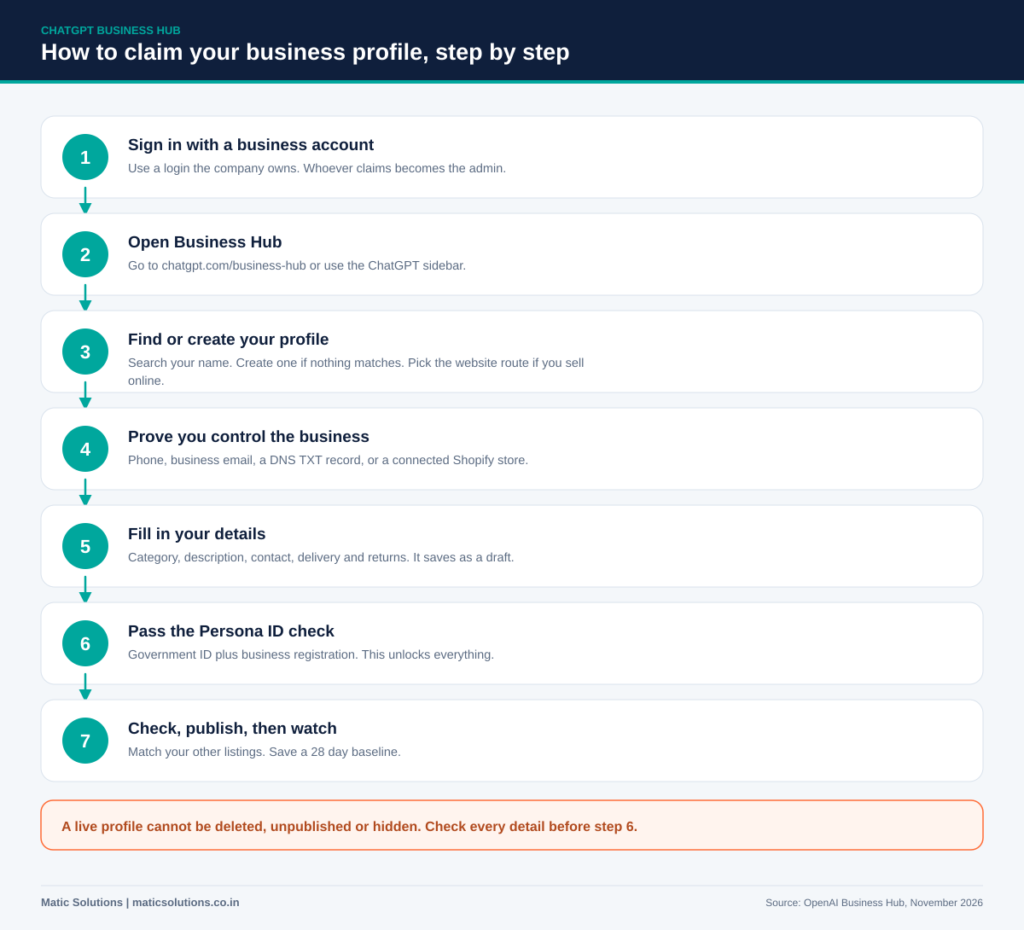
Step 1. Sign in with the right account
Use an account the business controls. The person who claims the profile becomes its admin, and the admin invites everyone else later. A shared business login saves you a headache if that person leaves. Your agency can be added as a teammate afterwards, each with their own login.
Step 2. Open Business Hub
Go to chatgpt.com/business-hub, or click Business Hub in the ChatGPT sidebar.
Step 3. Find or create your profile
Search for your business by name. If ChatGPT already lists you, select the match. If nothing comes up, choose the option to create a new profile.
You’ll then pick how customers deal with you. Pick “through a website” for an online business. The physical location route sends many non-US owners to a waitlist.
Step 4. Prove you control the business
Pick one of four methods. More on these in the next section.
Step 5. Fill in your details
Choose a category from the list OpenAI offers. ChatGPT usually suggests a few options, so pick the closest fit. Add your description, your contact details, and your delivery and returns answers. Some fields are optional. Your profile saves as a draft at this stage, so nothing is public yet.
Step 6. Pass the Persona ID check
This is the second gate, and it’s the one that unlocks everything useful.
Step 7. Check, publish and then watch
Once approved, review your live profile against your Google profile and your website so the facts line up. Then let the insights build. Save a 28 day screenshot early so you have a baseline to compare against.
The four ways to verify your business
| Method | How it works | Best for |
|---|---|---|
| Business phone | A code arrives by text or automated call to your listed business number. | Existing US local listings |
| Business email | A code arrives at your business email address. | Owners who control the company inbox |
| Website domain | You add a TXT record that OpenAI gives you to your DNS settings, then verify. | Online businesses with DNS access |
| Shopify | You connect your store from Business Hub or from the Shopify admin. | Shopify merchants |
The domain method is the most dependable one for an online business, because you control your DNS. Allow time for the record to spread before you hit verify. Claims verified by Shopify and by DNS have come back approved the same day, though OpenAI only commits to saying review times vary.
If a claim fails or waitlists you on the first try, wait and try again, or switch methods.
The Persona ID check, explained
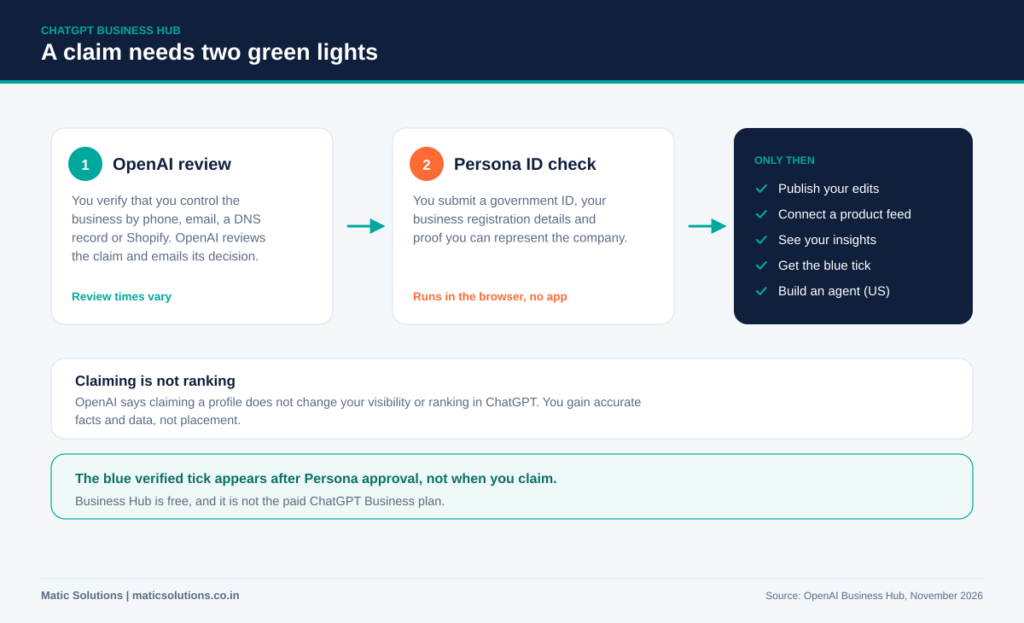
Verifying your phone or domain proves you control a channel. The Persona check proves you’re a real person with authority over the business. Both have to clear.
Persona runs in your browser through a QR code or a secure link. You need camera access, and you don’t need to install anything. Expect to hand over a government ID, your business registration papers, and proof you can speak for the company.
Here’s why it matters so much. Until Persona approves you, you can’t publish edits, connect a product feed, see your insights, or build an agent. The blue tick arrives with that approval too.
One more thing, and it’s the big one. If Persona creates a brand new profile for you, approval publishes it straight away. So check every word before you submit.
What you can edit once you're verified
After approval you can change the following:
- Your website
- Your business description
- Your product or service category
- Your logo
- Your cover photo
- Your delivery policy
- Your return policy
OpenAI reviews each change before it goes live, and edits can take a while to appear in profiles and in answers. ChatGPT can also still draw on other sources, so your profile shapes the facts rather than replacing everything.
Online sellers can add a product feed by CSV upload, a hosted URL, or a Shopify connection. The feed carries prices and stock. It doesn’t guarantee that ChatGPT will recommend your products.
What Business Hub insights actually show
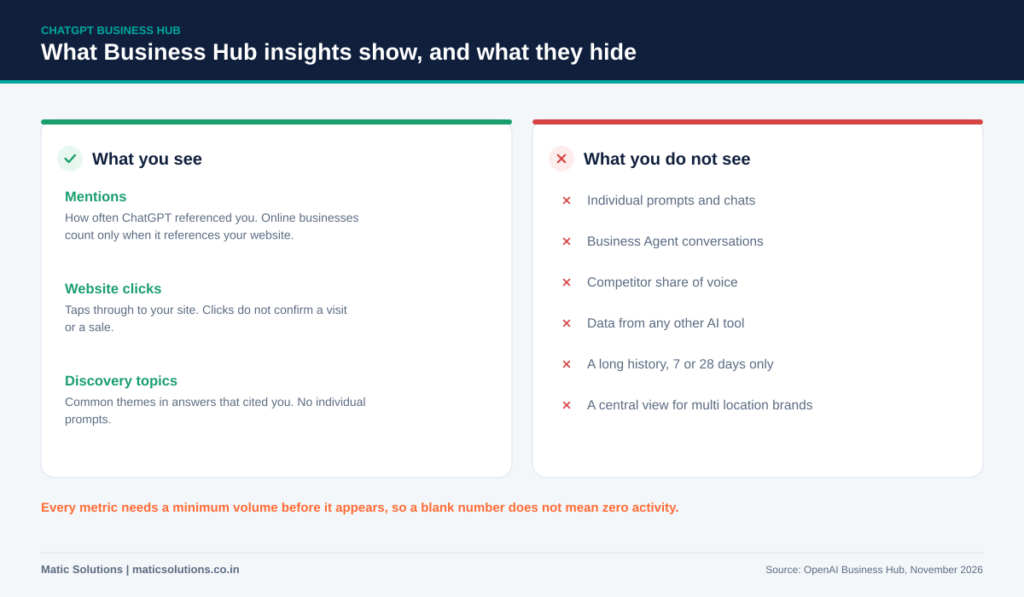
The insights tab is the part most marketers get excited about, so it’s worth knowing its edges.
You get three things. Mentions, which count how often ChatGPT referenced you. Website clicks, which count taps through to your site. And discovery topics, which are the common themes in answers that cited you.
How a mention gets counted depends on your type. For an online business, it counts when ChatGPT references your website. Your brand name on its own doesn’t count. For a US local listing, it counts when ChatGPT shows your location, even if nobody opens the card.
Now the limits, because they’re real.
- The dashboard covers 7 or 28 days. There’s no long history yet.
- Every metric needs a minimum volume before it appears. A blank number doesn’t mean zero activity.
- Clicks don’t confirm a visit or a sale. OpenAI says so in its own tooltip.
- You can’t see prompts, chats, competitor share of voice, or data from any other AI tool.
- Multi location brands get no central view. Claiming the parent brand doesn’t claim each site.
Read it as a trend line, not a ledger. Mentions tend to run far ahead of clicks, which tells you something useful on its own. People are hearing your name inside the answer without ever leaving ChatGPT.
ChatGPT Business Hub vs Google Business Profile
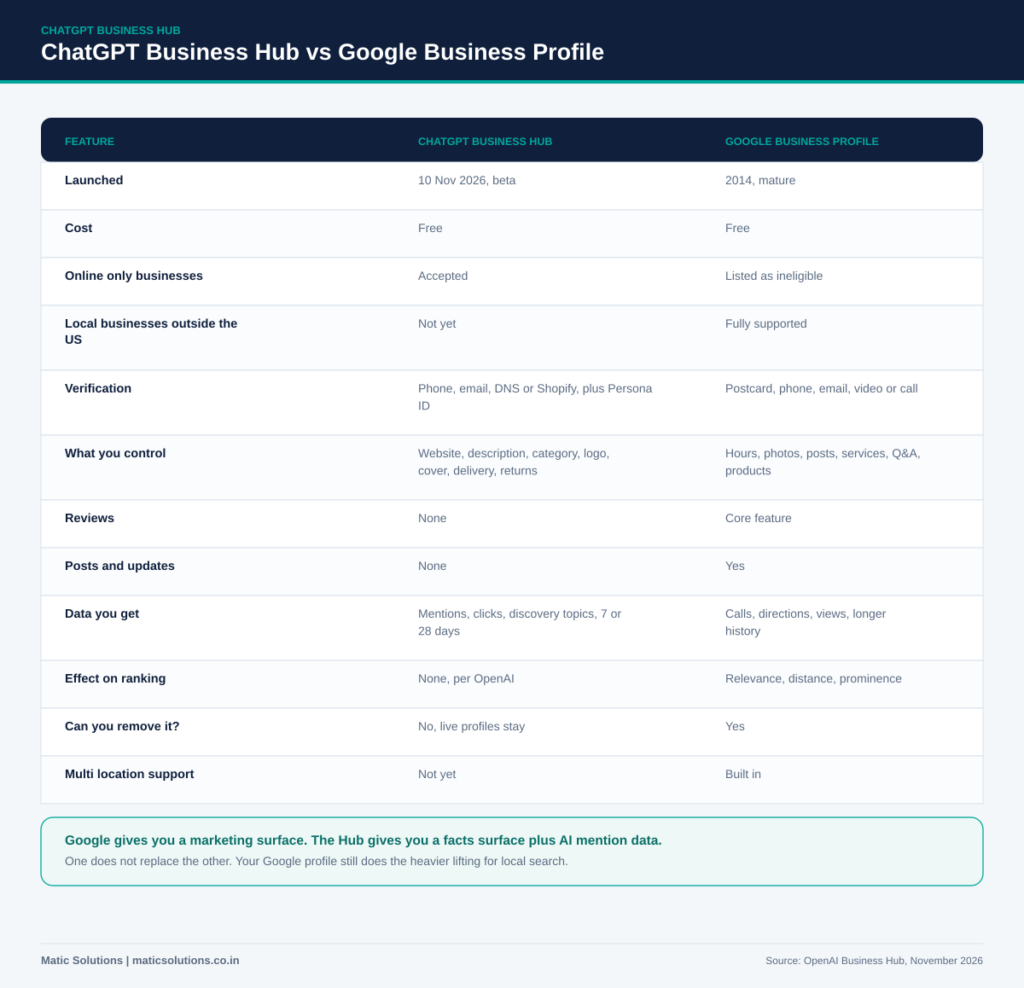
The short version is that Google gives you a marketing surface, while the Hub gives you a facts surface plus a window into AI mentions. One doesn’t replace the other, and your Google profile still does the heavier lifting for local search.
Mistakes to avoid
Claiming from a personal account. The claimer becomes admin. If that’s a freelancer’s private login, you’ve handed over your profile.
Rushing past the detail check. You can delete an unpublished draft from the three dot menu on its Overview page. You can’t delete a live profile, and OpenAI support can’t unpublish or hide one for you either.
Mismatched legal details. Your registered name, address and tax number have to match official records. Pull them from the source rather than from memory.
Expecting a ranking lift. It won’t come. Treat the claim as hygiene and data, then do the real visibility work on your site and your off site mentions.
Letting an agency claim on your behalf. Claim it yourself under a business owned account, then invite your agency in. You keep the keys.
Assuming a blank metric means nothing happened. Reporting thresholds hide low numbers.
If you can't claim yet, do this instead
Plenty of local businesses in India and Australia are shut out for now. That’s no reason to sit still, because the same groundwork feeds every AI answer engine.
Start with your own site, since that’s what ChatGPT reads. Make your name, address, phone number and hours identical everywhere they appear. Add LocalBusiness or Organization schema so machines can parse your details. Write real answers to the questions customers actually ask, in plain language a model can lift.
Then check your crawler access. If your robots.txt blocks OpenAI’s crawlers, you’ve locked yourself out of the answers. Let them in unless you have a reason not to.
Keep your Google Business Profile accurate. ChatGPT leans on outside sources for local facts, and that takes in directories and review sites. Oddly, ChatGPT often shows a Yelp or Tripadvisor rating rather than a Google one, so your listings on those sites matter more than you’d guess.
Last, set up tracking. Tag your traffic in GA4 so you can see referrals from ChatGPT when they arrive. Then revisit Business Hub every few weeks with your own login. Eligibility is moving.
Where to go from here
Claiming your ChatGPT business profile takes about twenty minutes if your paperwork is ready. It won’t move you up the pecking order, and it was never going to. What it does is stop ChatGPT guessing about you, and it hands you a first real look at how often your name comes up inside AI answers.
If you’re eligible, do it this week and save a 28 day baseline. If you’re not eligible yet, spend that time on your site structure, your schema, your crawler access and your third party listings, because every one of those feeds the answer ChatGPT gives with or without a claim.
Need a hand working out where your business stands in AI search?
That's the kind of groundwork we do at Matic Solutions every day.
Drop us a line at info@maticsolutions.co.in or call +91 98798 72727 and we'll take a look at your setup.
Talk to our teamFrequently Asked Questions
Yes. There’s no fee to claim or manage a profile, and business agents are free at launch too. OpenAI hasn’t promised anything about future pricing.
No. The paid ChatGPT Business plan is a subscription for teams. Business Hub is a free profile dashboard. You don’t need one to use the other.
OpenAI says it varies, and tells you by email. Shopify and DNS claims have cleared the same day for some owners. Some launch day claims failed or waitlisted, so a retry is reasonable.
If you run an online business with a website, most likely yes. If you run a shop or restaurant, not yet, because local claims are limited to listings that already exist in the US.
No. OpenAI states that claiming doesn’t change your visibility or ranking. It gives you accuracy and data.
Open the profile menu and use the Dispute ownership option.
No. A published profile can’t be deleted, unpublished or hidden, and OpenAI support can’t do it for you. Only unpublished drafts can be deleted. Check everything first.
No. A product feed accepts a CSV upload or a hosted URL as well as a Shopify connection.