
How to Get Your Business Recommended by ChatGPT, Gemini & Google AI

How to Get Your Business Recommended by ChatGPT, Gemini & Google AI

Table of Contents

A customer in India needs a CA, a dentist or a web design company. A few years ago they’d type three words into Google and open five tabs. Now a lot of them ask ChatGPT, or read the AI Overview at the top of Google, and pick from the two or three names the answer gives them.

That change is moving fast. 

ChatGPT had 900 million weekly users by February 2026, and India is now its biggest market with more than 100 million of them. At Google I/O in May 2026, Google said AI Overviews reach over 2.5 billion people a month, and the Gemini app passed 900 million monthly users around the same time.

So the job has changed. Ranking on page one still matters. But you also need the AI to know who you are, trust what it finds about you, and say your name when someone asks for a recommendation.

This guide shows you how that works. It’s built on what we see at Matic Solutions when we test client brands inside AI tools, plus what Google and OpenAI have said in public. You’ll get ten practical steps, a side-by-side look at how each platform finds businesses, and a quick way to check where you stand today.

Quick answer: To get your business recommended by ChatGPT, Gemini and Google AI Overviews, make it easy for AI to understand and trust you. Answer real customer questions in the first two lines of your pages. Add schema markup. Keep your name, address and phone number the same everywhere. Then build genuine Google reviews and earn mentions on other trusted websites. Strong SEO is still the base for all of it.

Key Takeaways

  • AI tools recommend businesses they can check. Clear facts, real reviews and outside mentions count for more than clever copy.
  • Put the answer first. A 40 to 60 word reply under each question heading is what AI lifts into its answers.
  • ChatGPT, Gemini and Google AI Overviews all draw on the open web, so good SEO is still your entry ticket.
  • Your Google Business Profile and reviews feed local AI answers directly. A thin profile makes you easy to skip.
  • Use one name, one address and one phone number everywhere. Mixed details make AI unsure, and an unsure AI names a competitor.
  • Schema markup helps machines read your pages. llms.txt is optional, and Google says its Search features don’t use it.
  • Test yourself every month. Ask the tools what your customers ask, note who gets named, and fix the gaps.

What does it mean when AI recommends your business?

An AI recommendation is when ChatGPT, Gemini or Google’s AI Overview names your business in its answer. Think of a question like “best interior designer in Ahmedabad” or “which CA firm helps startups with GST”. Nobody pays for that spot. The AI names the businesses it can find, understand and trust.

Here’s the honest part. No one can promise you a mention. Answers shift with the wording of the question, the user’s location and even the day. What you can do is make your business the safest, clearest name for the AI to give.

You’ll hear a few labels for this work. GEO (Generative Engine Optimisation) and AEO (Answer Engine Optimisation) are the common ones. We explain how they fit with SEO in our guide on why SEO, AEO, GEO and AIO work fails. For now, keep it simple. SEO gets you ranked. This work gets you named.

How do ChatGPT, Gemini and Google AI choose which businesses to recommend?

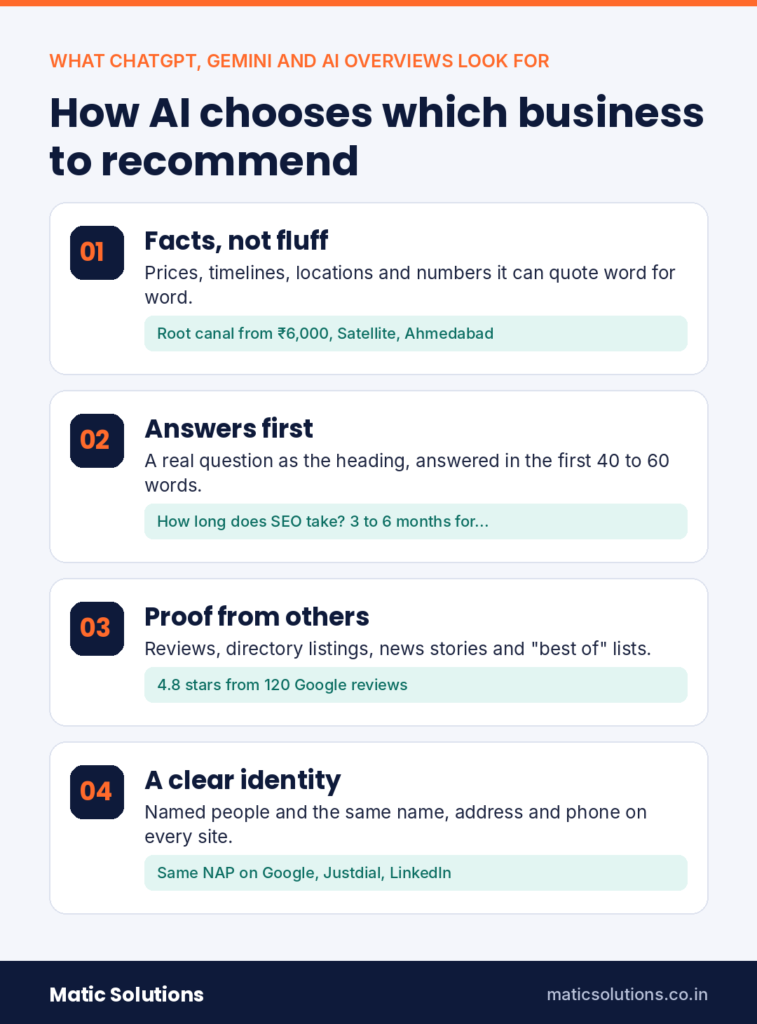
AI tools recommend businesses they can verify. Each one pulls from its training data, a live web search and structured sources like reviews, maps and directories. The businesses that get named usually share four traits.

They give facts, not fluff. “Root canal from ₹6,000, same-week appointments, clinic in Satellite, Ahmedabad” is easy for an AI to quote. “World-class care for your smile” gives it nothing to work with.

Their answers come first. Pages that ask a real question and answer it in the opening lines get pulled into AI replies. Pages that hide the answer under 800 words of warm-up get passed over.

Other people vouch for them. Reviews, directory listings, news stories and “best of” lists all count. AI systems are built to be wary of a business that only praises itself.

Their identity is clear. They have a named team, a real address and the same details on every site. When facts clash, the AI hedges. A hedging AI tends to recommend someone else.
how ai chooses businesses

ChatGPT vs Gemini vs Google AI Overviews: how each one finds businesses

Comparison ChatGPT Gemini Google AI Overviews and AI Mode
Where people use it ChatGPT app and website Gemini app, Android and Google apps like Gmail Top of Google Search results and the AI Mode tab
Where it finds business info Training data, plus live web search when browsing is enabled Google Search results and Google data such as Maps Google's search index, Business Profiles and Maps
What it leans on most Clear answers, mentions on other sites and review platforms Google Business Profile, reviews and well-structured pages Pages that already rank well, reviews and local data
Crawler you must not block OAI-SearchBot for search and GPTBot for training Googlebot and Google-Extended if you want to allow eligible Gemini-related use of your content Googlebot
Fastest win Consistent listings on directories, review sites and Bing Places A complete Google Business Profile with fresh reviews Rewrite top pages so the answer appears in the first two lines
How to check Ask in a logged-out chat with search turned on Ask in the Gemini app with your city in the prompt Search your service plus city on Google and review the AI Overview

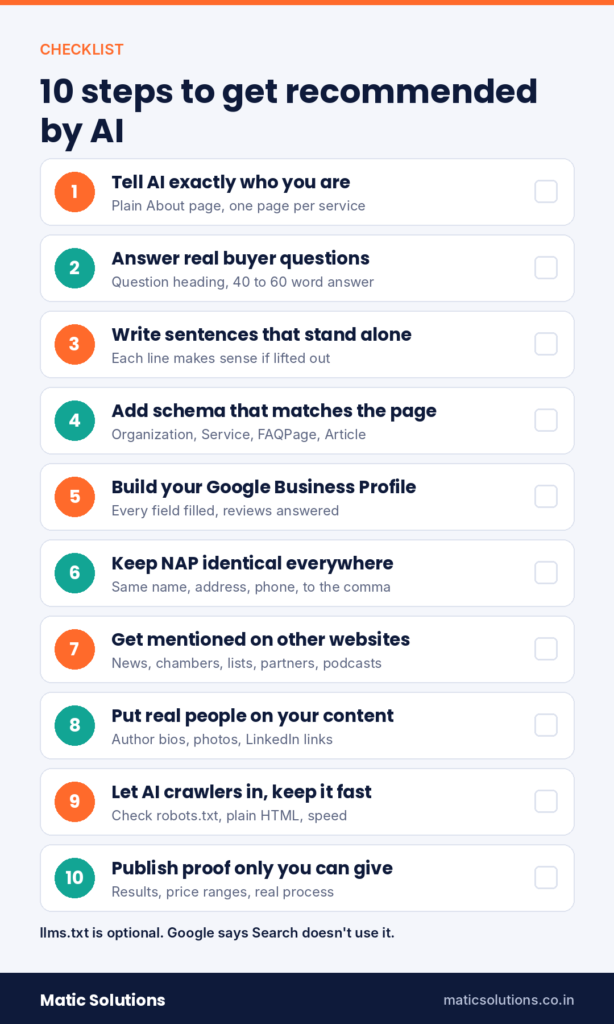
10 steps to get your business recommended by AI
10 step ai recommendation checklist

1. Tell AI exactly who you are

Start with your home page and About page. State your business name, what you do, who you serve, where you’re based and when you started, in plain words. Your About page should read like a short encyclopaedia entry, not a mission statement.

Give each main service its own page too. One page that lists everything makes it hard for an AI to match you to a specific question. A clear website structure with a page per service fixes that.

2. Build pages that answer real buyer questions

Pick the questions buyers actually ask before they hire you. These are usually about cost, time, comparisons, whether it’s worth it and how to choose. Make each question a heading, and answer it in 40 to 60 words straight after.

Where do the questions come from? Look at Google’s “People also ask” box, your sales calls, WhatsApp enquiries and Search Console queries of four words or more. People talk to AI the way they speak, so this also helps with voice search.

Use real numbers wherever you can. A price range, a timeline or a minimum order gives the AI something solid to repeat.

3. Write sentences that still make sense on their own

AI tools lift passages, not whole pages. A sentence that depends on the one before it often gets dropped.

Here’s a weak line: “It usually takes three to six months.” What takes three to six months? The AI can’t tell. A better line reads like this: “SEO for a local Ahmedabad business usually takes three to six months to show steady results.” Now it can be quoted anywhere.

Take five sentences from your most important page and read each one alone. Rewrite any that need their neighbours to make sense.

4. Add schema markup that matches the page

Schema is code that labels your content for machines. It tells them “this is a business, this is its address, this is a service, this is the author”. At a minimum, add these types.

  • Organization or LocalBusiness on your home page
  • Service on each service page
  • FAQPage where real questions and answers appear on the page
  • Article with Person markup on blog posts
  • BreadcrumbList across the site

One thing to know. Since 2023, Google shows FAQ rich results mostly for government and health sites, so don’t expect the dropdowns in normal search. The markup still helps machines read your page. Just make sure it matches what visitors can see and what your Google Business Profile says. Our technical SEO checklist covers the rest of the setup.

5. Treat your Google Business Profile as a sales page

For “near me” and city searches, your Google Business Profile is often the first thing Gemini and AI Overviews look at. Fill in every field you can. That means categories, services, hours, photos, products and regular posts.

Reviews matter just as much. Ask every happy customer, and make it easy with a direct link or a QR code at the counter. Reply to every review, good or bad. When customers mention the service they used and the area they’re in, that text often shows up in AI answers.

Never buy reviews or post fake ones. Google removes them and can restrict your profile, and AI tools are getting better at spotting the pattern. Our local SEO guide walks through profile setup step by step.

6. Keep your details identical everywhere

Your business name, address and phone number (NAP) should match on every site. Check your website, Google Business Profile, Bing Places, Justdial, IndiaMART, Sulekha, LinkedIn and Facebook. Agencies and IT firms should check Clutch and GoodFirms too.

Small differences cause real trouble. If one site says “Aaryan Work Spaces” and another says “Aryan Workspace”, an AI may not be sure they’re the same business. Pick one version and use it everywhere, down to the commas.

7. Get talked about on other websites

One honest paragraph about you on someone else’s site is worth more than ten pages of your own copy. It’s proof from a third party, and AI tools weigh that heavily.

Good places to start include local news, industry bodies like your chamber of commerce, supplier and partner pages, “best of” lists in your city, podcasts and guest articles. Helpful answers on Reddit and Quora can count too, as long as they’re genuine. Even mentions without a link help. Links still matter for SEO, which we cover in our post on backlinks.

What about Wikipedia? Only go there if your business has real coverage in independent media. Wikipedia has strict notability rules, and a promotional page will be deleted.

8. Put real people behind your content

AI tools trust content that has an accountable human behind it. Add an author name, a short bio, a photo and a LinkedIn link to every blog post. Build a team page that shows who does the work.

An “Admin” byline on an expert article tells the AI nothing. A named strategist with eight years of experience tells it a lot. This is what Google means by E-E-A-T, and AI systems look for the same signals.

9. Let AI crawlers in and keep the site fast

Check your robots.txt file. Make sure you aren’t blocking OAI-SearchBot, GPTBot, Googlebot or PerplexityBot by accident. Some hosting and CDN settings, including Cloudflare’s AI bot controls, can block them without you noticing.

Keep your main content in plain HTML. Many AI crawlers don’t run JavaScript, so text that only loads through scripts may be invisible to them. Speed matters too, because slow pages get crawled less thoroughly. Our guide to Core Web Vitals shows what to fix first.

You may have heard of llms.txt, a plain text file that summarises your site for AI. Treat it as optional. Google’s own AI optimisation guide from May 2026 says Search doesn’t use it for AI Overviews or AI Mode. Some OpenAI and Microsoft crawlers have been seen fetching it, so it’s not useless. If you have a spare hour, add one. Just don’t put it ahead of steps 1 to 8.

10. Publish proof only you can give

AI tools have read thousands of generic articles on every topic. Another “What is SEO?” post adds nothing. What stands out is information nobody else has.

Share client results with real numbers, honest price ranges, your actual process and the mistakes you’ve learned from. Cite your sources for any facts you quote. A page like that gives the AI a reason to name you, because it can’t get the same detail anywhere else.

How to check if AI already recommends your business
10 minute ai visibility test

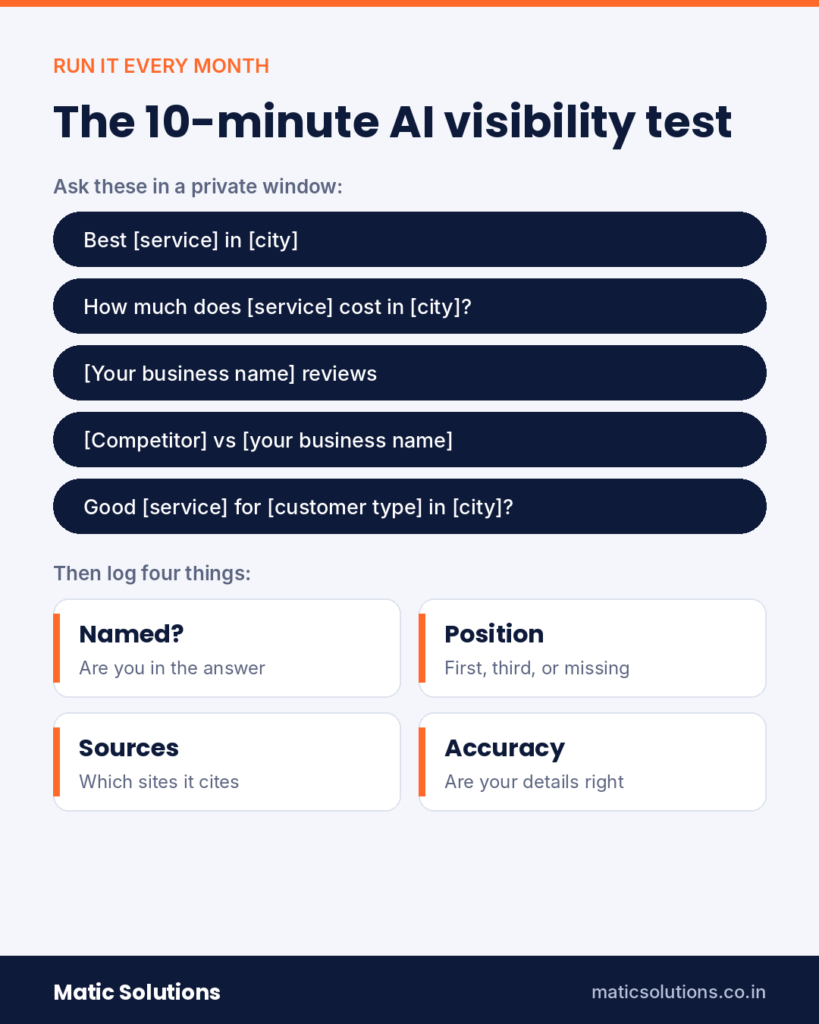
You can run a basic check in about ten minutes. Use a logged-out or private browser window so past chats don’t skew the answers. In ChatGPT, make sure search is turned on.

Try prompts like these, with your own service and city.

  • “Best [your service] in [your city]”
  • “How much does [your service] cost in [your city]?”
  • “[Your business name] reviews”
  • “[Competitor] vs [your business name]”
  • “Who is a good [your service] for [type of customer] in [your city]?”

Note whether you’re named, where you appear, which sources get cited and whether the facts are right. Run each prompt two or three times, because answers vary. Repeat the test every month so you can see change over time.

If an AI says something wrong about you, find the source. It’s usually an old directory listing or an out-of-date page on your own site. Fix that and the answer tends to follow.

For numbers, set up a GA4 report for visits from chatgpt.com, gemini.google.com and perplexity.ai. Search Console counts clicks from AI Overviews and AI Mode inside its normal web report, so watch your branded searches too. When AI tools start naming you, more people search for you by name.

Common mistakes that keep businesses out of AI answers

  • Buying fake reviews. They get removed, and they can get your profile restricted.
  • Publishing dozens of thin, AI-written posts. Volume without new information doesn’t help.
  • Hiding all prices behind “contact us”. Give a range so the AI has something to quote.
  • Blocking AI crawlers by accident through robots.txt or a security plugin.
  • Paying for a “guaranteed ChatGPT ranking”. Nobody can promise that. ChatGPT has tested ads since February 2026, but they’re labelled as sponsored and sit apart from the answer.
  • Treating this as a one-time job. AI answers change, so your checks should be regular.

Conclusion

Getting recommended by ChatGPT, Gemini and Google AI comes down to being easy to understand and easy to trust. Answer real questions clearly. Keep your details consistent. Earn reviews and mentions from real people, and keep your website fast and open to crawlers.

None of this replaces SEO. It builds on it. The businesses doing both right now have a head start, because most of their competitors haven’t started yet.

Want AI tools to start naming your business?

Matic Solutions is a web design and digital marketing agency in Ahmedabad. We help businesses in India and Australia get found on Google and inside AI answers, through SEO, content

We'll test how ChatGPT, Gemini and Google AI describe your business today and show you what to fix first.

Talk to our team

Frequently Asked Questions

Make your business easy to verify. Publish clear service pages that answer customer questions in the first two lines, add schema markup and keep your details consistent across directories. Then earn genuine reviews and mentions on other websites. There’s no guaranteed method, but these steps make you a much safer name for ChatGPT to give.

You can’t pay to be named inside the answer itself. ChatGPT began testing ads for some free users in February 2026, and Google shows ads near AI Overviews, but both are labelled as sponsored and kept apart from the answer. The organic recommendation has to be earned.

GEO builds on SEO. SEO helps your pages rank as links that people click. GEO helps AI tools understand your business well enough to name it in their answers. Both rely on a fast website, useful content and trust signals, so most of the work overlaps.

Most businesses see early changes in two to three months and steadier results in three to six months. Quick fixes like answer-first rewrites and schema can show up sooner in Google AI Overviews. Mentions on other sites and reviews take longer to build.

Yes, especially for local searches. Gemini and Google AI Overviews draw on your Google Business Profile, and review count, rating and wording all shape what they say. ChatGPT also reads review platforms and directories when it searches the web.

It’s optional. Google has said its Search features, including AI Overviews and AI Mode, don’t use llms.txt. Some other AI crawlers do fetch it, so adding one won’t hurt. Focus first on content, schema, reviews and consistent business details.

It matters even more. Questions like “best plumber near me” or “good bakery in Vastrapur” are some of the most common prompts people ask AI. In most Indian cities, few local businesses have done this work yet, so it’s easier to stand out now than it will be later.

Author Bio

Matic Solutions

Matic Solution is a leading web development & Digital Marketing Agency in Ahmedabad. We offer top-notch Website Design and Development, SMM, SEO, PPC, Logo Design, Mobile App Development, and Website Domain and Hosting services. The goal of our business is to help you reach your full potential by improving your business.

A customer in India needs a CA, a dentist or a web design company. A few years ago they’d type three words into Google and open five tabs. Now a lot of them ask ChatGPT, or read the AI Overview at the top of Google, and pick from the two or three names the answer gives them.

That change is moving fast. 

ChatGPT had 900 million weekly users by February 2026, and India is now its biggest market with more than 100 million of them. At Google I/O in May 2026, Google said AI Overviews reach over 2.5 billion people a month, and the Gemini app passed 900 million monthly users around the same time.

So the job has changed. Ranking on page one still matters. But you also need the AI to know who you are, trust what it finds about you, and say your name when someone asks for a recommendation.

This guide shows you how that works. It’s built on what we see at Matic Solutions when we test client brands inside AI tools, plus what Google and OpenAI have said in public. You’ll get ten practical steps, a side-by-side look at how each platform finds businesses, and a quick way to check where you stand today.

Quick answer: To get your business recommended by ChatGPT, Gemini and Google AI Overviews, make it easy for AI to understand and trust you. Answer real customer questions in the first two lines of your pages. Add schema markup. Keep your name, address and phone number the same everywhere. Then build genuine Google reviews and earn mentions on other trusted websites. Strong SEO is still the base for all of it.

Key Takeaways

  • AI tools recommend businesses they can check. Clear facts, real reviews and outside mentions count for more than clever copy.
  • Put the answer first. A 40 to 60 word reply under each question heading is what AI lifts into its answers.
  • ChatGPT, Gemini and Google AI Overviews all draw on the open web, so good SEO is still your entry ticket.
  • Your Google Business Profile and reviews feed local AI answers directly. A thin profile makes you easy to skip.
  • Use one name, one address and one phone number everywhere. Mixed details make AI unsure, and an unsure AI names a competitor.
  • Schema markup helps machines read your pages. llms.txt is optional, and Google says its Search features don’t use it.
  • Test yourself every month. Ask the tools what your customers ask, note who gets named, and fix the gaps.

What does it mean when AI recommends your business?

An AI recommendation is when ChatGPT, Gemini or Google’s AI Overview names your business in its answer. Think of a question like “best interior designer in Ahmedabad” or “which CA firm helps startups with GST”. Nobody pays for that spot. The AI names the businesses it can find, understand and trust.

Here’s the honest part. No one can promise you a mention. Answers shift with the wording of the question, the user’s location and even the day. What you can do is make your business the safest, clearest name for the AI to give.

You’ll hear a few labels for this work. GEO (Generative Engine Optimisation) and AEO (Answer Engine Optimisation) are the common ones. We explain how they fit with SEO in our guide on why SEO, AEO, GEO and AIO work fails. For now, keep it simple. SEO gets you ranked. This work gets you named.

How do ChatGPT, Gemini and Google AI choose which businesses to recommend?

AI tools recommend businesses they can verify. Each one pulls from its training data, a live web search and structured sources like reviews, maps and directories. The businesses that get named usually share four traits.

They give facts, not fluff. “Root canal from ₹6,000, same-week appointments, clinic in Satellite, Ahmedabad” is easy for an AI to quote. “World-class care for your smile” gives it nothing to work with.

Their answers come first. Pages that ask a real question and answer it in the opening lines get pulled into AI replies. Pages that hide the answer under 800 words of warm-up get passed over.

Other people vouch for them. Reviews, directory listings, news stories and “best of” lists all count. AI systems are built to be wary of a business that only praises itself.

Their identity is clear. They have a named team, a real address and the same details on every site. When facts clash, the AI hedges. A hedging AI tends to recommend someone else.

how ai chooses businesses

ChatGPT vs Gemini vs Google AI Overviews: how each one finds businesses

Comparison ChatGPT Gemini Google AI Overviews and AI Mode
Where people use it ChatGPT app and website Gemini app, Android and Google apps like Gmail Top of Google Search results and the AI Mode tab
Where it finds business info Training data, plus live web search when browsing is enabled Google Search results and Google data such as Maps Google's search index, Business Profiles and Maps
What it leans on most Clear answers, mentions on other sites and review platforms Google Business Profile, reviews and well-structured pages Pages that already rank well, reviews and local data
Crawler you must not block OAI-SearchBot for search and GPTBot for training Googlebot and Google-Extended if you want to allow eligible Gemini-related use of your content Googlebot
Fastest win Consistent listings on directories, review sites and Bing Places A complete Google Business Profile with fresh reviews Rewrite top pages so the answer appears in the first two lines
How to check Ask in a logged-out chat with search turned on Ask in the Gemini app with your city in the prompt Search your service plus city on Google and review the AI Overview

10 steps to get your business recommended by AI

10 step ai recommendation checklist

1. Tell AI exactly who you are

Start with your home page and About page. State your business name, what you do, who you serve, where you’re based and when you started, in plain words. Your About page should read like a short encyclopaedia entry, not a mission statement.

Give each main service its own page too. One page that lists everything makes it hard for an AI to match you to a specific question. A clear website structure with a page per service fixes that.

2. Build pages that answer real buyer questions

Pick the questions buyers actually ask before they hire you. These are usually about cost, time, comparisons, whether it’s worth it and how to choose. Make each question a heading, and answer it in 40 to 60 words straight after.

Where do the questions come from? Look at Google’s “People also ask” box, your sales calls, WhatsApp enquiries and Search Console queries of four words or more. People talk to AI the way they speak, so this also helps with voice search.

Use real numbers wherever you can. A price range, a timeline or a minimum order gives the AI something solid to repeat.

3. Write sentences that still make sense on their own

AI tools lift passages, not whole pages. A sentence that depends on the one before it often gets dropped.

Here’s a weak line: “It usually takes three to six months.” What takes three to six months? The AI can’t tell. A better line reads like this: “SEO for a local Ahmedabad business usually takes three to six months to show steady results.” Now it can be quoted anywhere.

Take five sentences from your most important page and read each one alone. Rewrite any that need their neighbours to make sense.

4. Add schema markup that matches the page

Schema is code that labels your content for machines. It tells them “this is a business, this is its address, this is a service, this is the author”. At a minimum, add these types.

  • Organization or LocalBusiness on your home page
  • Service on each service page
  • FAQPage where real questions and answers appear on the page
  • Article with Person markup on blog posts
  • BreadcrumbList across the site

One thing to know. Since 2023, Google shows FAQ rich results mostly for government and health sites, so don’t expect the dropdowns in normal search. The markup still helps machines read your page. Just make sure it matches what visitors can see and what your Google Business Profile says. Our technical SEO checklist covers the rest of the setup.

5. Treat your Google Business Profile as a sales page

For “near me” and city searches, your Google Business Profile is often the first thing Gemini and AI Overviews look at. Fill in every field you can. That means categories, services, hours, photos, products and regular posts.

Reviews matter just as much. Ask every happy customer, and make it easy with a direct link or a QR code at the counter. Reply to every review, good or bad. When customers mention the service they used and the area they’re in, that text often shows up in AI answers.

Never buy reviews or post fake ones. Google removes them and can restrict your profile, and AI tools are getting better at spotting the pattern. Our local SEO guide walks through profile setup step by step.

6. Keep your details identical everywhere

Your business name, address and phone number (NAP) should match on every site. Check your website, Google Business Profile, Bing Places, Justdial, IndiaMART, Sulekha, LinkedIn and Facebook. Agencies and IT firms should check Clutch and GoodFirms too.

Small differences cause real trouble. If one site says “Aaryan Work Spaces” and another says “Aryan Workspace”, an AI may not be sure they’re the same business. Pick one version and use it everywhere, down to the commas.

7. Get talked about on other websites

One honest paragraph about you on someone else’s site is worth more than ten pages of your own copy. It’s proof from a third party, and AI tools weigh that heavily.

Good places to start include local news, industry bodies like your chamber of commerce, supplier and partner pages, “best of” lists in your city, podcasts and guest articles. Helpful answers on Reddit and Quora can count too, as long as they’re genuine. Even mentions without a link help. Links still matter for SEO, which we cover in our post on backlinks.

What about Wikipedia? Only go there if your business has real coverage in independent media. Wikipedia has strict notability rules, and a promotional page will be deleted.

8. Put real people behind your content

AI tools trust content that has an accountable human behind it. Add an author name, a short bio, a photo and a LinkedIn link to every blog post. Build a team page that shows who does the work.

An “Admin” byline on an expert article tells the AI nothing. A named strategist with eight years of experience tells it a lot. This is what Google means by E-E-A-T, and AI systems look for the same signals.

9. Let AI crawlers in and keep the site fast

Check your robots.txt file. Make sure you aren’t blocking OAI-SearchBot, GPTBot, Googlebot or PerplexityBot by accident. Some hosting and CDN settings, including Cloudflare’s AI bot controls, can block them without you noticing.

Keep your main content in plain HTML. Many AI crawlers don’t run JavaScript, so text that only loads through scripts may be invisible to them. Speed matters too, because slow pages get crawled less thoroughly. Our guide to Core Web Vitals shows what to fix first.

You may have heard of llms.txt, a plain text file that summarises your site for AI. Treat it as optional. Google’s own AI optimisation guide from May 2026 says Search doesn’t use it for AI Overviews or AI Mode. Some OpenAI and Microsoft crawlers have been seen fetching it, so it’s not useless. If you have a spare hour, add one. Just don’t put it ahead of steps 1 to 8.

10. Publish proof only you can give

AI tools have read thousands of generic articles on every topic. Another “What is SEO?” post adds nothing. What stands out is information nobody else has.

Share client results with real numbers, honest price ranges, your actual process and the mistakes you’ve learned from. Cite your sources for any facts you quote. A page like that gives the AI a reason to name you, because it can’t get the same detail anywhere else.

How to check if AI already recommends your business

10 minute ai visibility test

You can run a basic check in about ten minutes. Use a logged-out or private browser window so past chats don’t skew the answers. In ChatGPT, make sure search is turned on.

Try prompts like these, with your own service and city.

  • “Best [your service] in [your city]”
  • “How much does [your service] cost in [your city]?”
  • “[Your business name] reviews”
  • “[Competitor] vs [your business name]”
  • “Who is a good [your service] for [type of customer] in [your city]?”

Note whether you’re named, where you appear, which sources get cited and whether the facts are right. Run each prompt two or three times, because answers vary. Repeat the test every month so you can see change over time.

If an AI says something wrong about you, find the source. It’s usually an old directory listing or an out-of-date page on your own site. Fix that and the answer tends to follow.

For numbers, set up a GA4 report for visits from chatgpt.com, gemini.google.com and perplexity.ai. Search Console counts clicks from AI Overviews and AI Mode inside its normal web report, so watch your branded searches too. When AI tools start naming you, more people search for you by name.

Common mistakes that keep businesses out of AI answers

  • Buying fake reviews. They get removed, and they can get your profile restricted.
  • Publishing dozens of thin, AI-written posts. Volume without new information doesn’t help.
  • Hiding all prices behind “contact us”. Give a range so the AI has something to quote.
  • Blocking AI crawlers by accident through robots.txt or a security plugin.
  • Paying for a “guaranteed ChatGPT ranking”. Nobody can promise that. ChatGPT has tested ads since February 2026, but they’re labelled as sponsored and sit apart from the answer.
  • Treating this as a one-time job. AI answers change, so your checks should be regular.

Conclusion

Getting recommended by ChatGPT, Gemini and Google AI comes down to being easy to understand and easy to trust. Answer real questions clearly. Keep your details consistent. Earn reviews and mentions from real people, and keep your website fast and open to crawlers.

None of this replaces SEO. It builds on it. The businesses doing both right now have a head start, because most of their competitors haven’t started yet.

Want AI tools to start naming your business?

Matic Solutions is a web design and digital marketing agency in Ahmedabad. We help businesses in India and Australia get found on Google and inside AI answers, through SEO, content

We'll test how ChatGPT, Gemini and Google AI describe your business today and show you what to fix first.

Talk to our team

Frequently Asked Questions

Make your business easy to verify. Publish clear service pages that answer customer questions in the first two lines, add schema markup and keep your details consistent across directories. Then earn genuine reviews and mentions on other websites. There’s no guaranteed method, but these steps make you a much safer name for ChatGPT to give.

You can’t pay to be named inside the answer itself. ChatGPT began testing ads for some free users in February 2026, and Google shows ads near AI Overviews, but both are labelled as sponsored and kept apart from the answer. The organic recommendation has to be earned.

GEO builds on SEO. SEO helps your pages rank as links that people click. GEO helps AI tools understand your business well enough to name it in their answers. Both rely on a fast website, useful content and trust signals, so most of the work overlaps.

Most businesses see early changes in two to three months and steadier results in three to six months. Quick fixes like answer-first rewrites and schema can show up sooner in Google AI Overviews. Mentions on other sites and reviews take longer to build.

Yes, especially for local searches. Gemini and Google AI Overviews draw on your Google Business Profile, and review count, rating and wording all shape what they say. ChatGPT also reads review platforms and directories when it searches the web.

It’s optional. Google has said its Search features, including AI Overviews and AI Mode, don’t use llms.txt. Some other AI crawlers do fetch it, so adding one won’t hurt. Focus first on content, schema, reviews and consistent business details.

It matters even more. Questions like “best plumber near me” or “good bakery in Vastrapur” are some of the most common prompts people ask AI. In most Indian cities, few local businesses have done this work yet, so it’s easier to stand out now than it will be later.
More notes