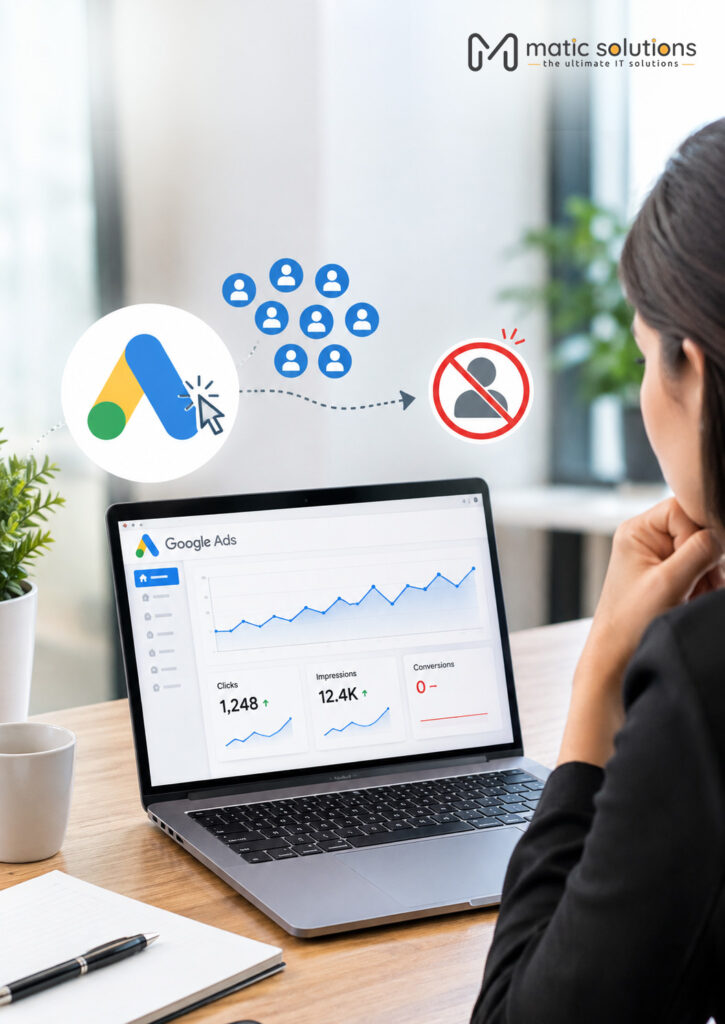
You open your Google Ads account and the numbers look fine. Clicks are coming in. The click-through rate is healthy and the budget is being spent. But the phone isn’t ringing and the enquiry inbox is empty.
This is one of the most common problems we see when businesses come to us for help with their ads. The good news is that it’s usually fixable. In most accounts the leak sits in one of four places. The tracking is broken, the wrong people are clicking, the landing page loses them, or Google’s bidding is chasing the wrong goal.
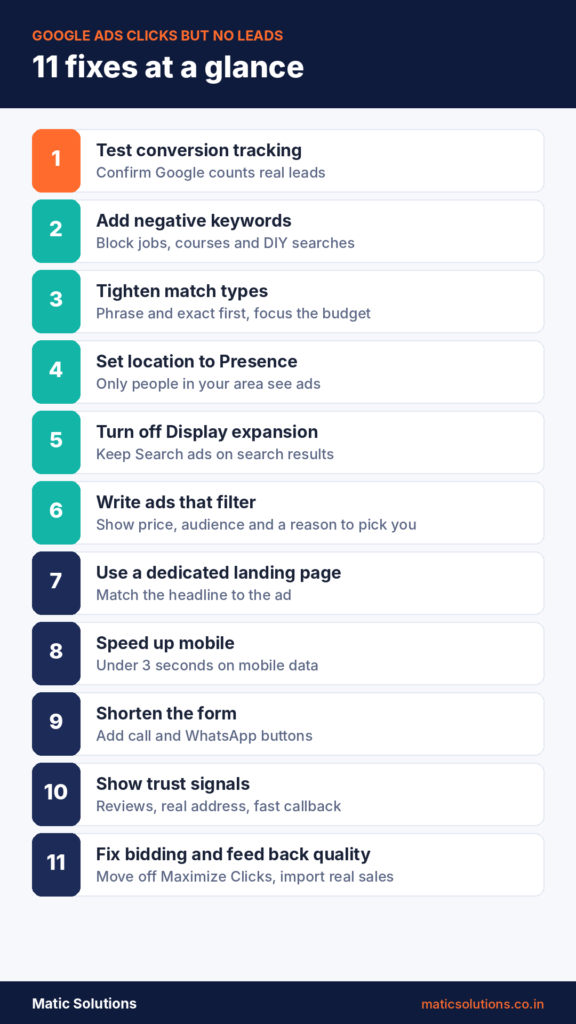
Below are 11 fixes, in the order we’d check them. Start at the top. Most accounts find the problem within the first five.
Quick answer If your Google Ads get clicks but no leads, first check that conversion tracking shows "Recording conversions", because leads may be arriving without being counted. Next, open the search terms report and block irrelevant searches with negative keywords. Then send traffic to a fast, mobile-friendly landing page that matches your ad, with a short form and a call button. Once leads are flowing, move to conversion-based bidding and tell Google which leads became customers.
Key Takeaways
- Test your tracking before you change anything. A broken tag can make a working campaign look dead.
- The search terms report shows what people really typed. Block job seekers and DIY searchers with negative keywords.
- Start with phrases and exact matches, and set your location to “Presence” so only people in your area see your ads.
- Send each ad to a landing page built for that search. Your homepage is too general to convert well.
- Most clicks come from phones. A slow page or a long form will quietly kill your leads, so add call and WhatsApp buttons.
- Maximize Clicks buys cheap traffic. Switch to conversion-based bidding once leads are tracked, then feed back which ones became customers.
- Judge results after 50 to 100 clicks. Zero leads from 20 clicks can be chance. Zero from 150 is a setup problem.
Why do Google Ads get clicks but no leads?
A click only means someone saw your ad and was curious enough to tap it. A lead means they trusted you enough to hand over a phone number. A lot can go wrong between those two moments.
It helps to know what normal looks like. WordStream’s 2026 benchmarks, based on more than 13,000 search campaigns, put the average click-through rate at 6.64%. WebFX puts typical lead generation conversion rates at around 7% to 12%. Even at a cautious 5%, 200 clicks should bring in about 10 leads. If you’ve had 200 clicks and zero inquiries, something is broken. It isn’t bad luck.
Sample size matters, though. With only 20 clicks, zero leads can happen by chance. Wait for 50 to 100 clicks before you judge a campaign. It’s also worth comparing with the same month last year. Some services slow down in certain seasons, and people still click out of curiosity when they aren’t ready to buy.
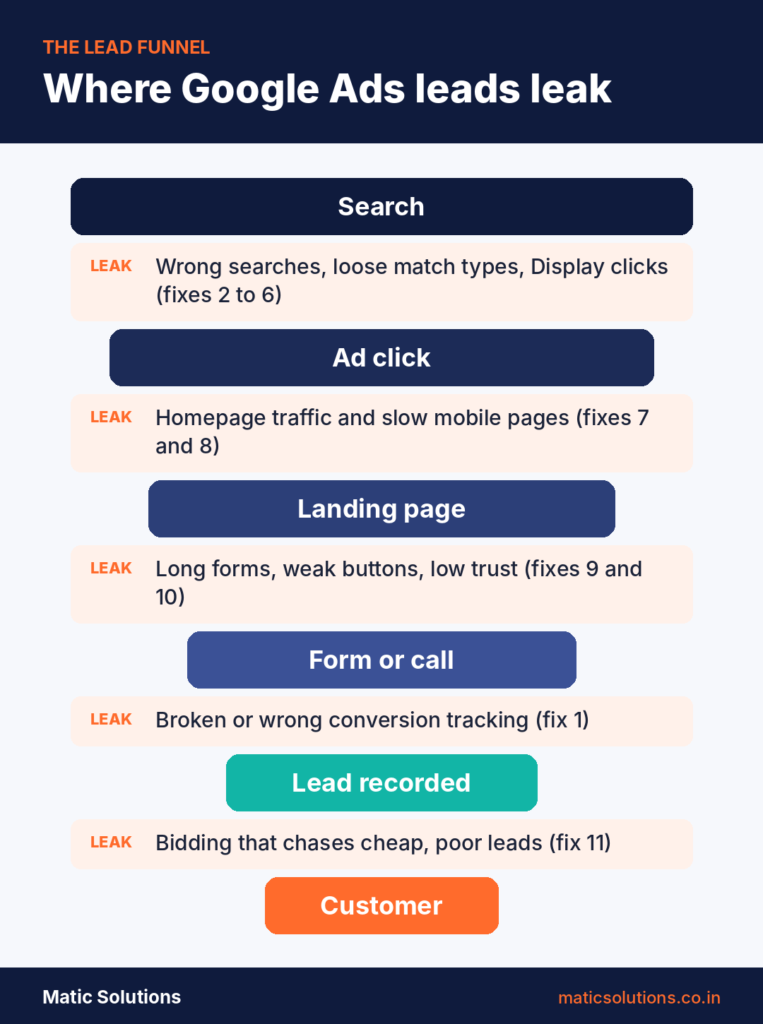
Think of it as a sales funnel with holes in it. The table below maps each common hole to what you’ll notice and where to look.
Comparison table of common causes and fixes
| Problem | What you'll notice | Where to check |
|---|---|---|
| Broken conversion tracking | Zero conversions, yet some enquiries reach your inbox | Goals > Conversions, Tag Assistant |
| Irrelevant search terms | Clicks from "jobs", "free" or "course" searches | Search terms report |
| Loose match types, thin budget | Clicks on searches that barely match your service | Keywords and search terms |
| Wrong location setting | Clicks from cities you don't serve | Locations report |
| Display or partner traffic | Cheap clicks, very short visits | Segment by network |
| Ads attract the wrong buyers | Leads that can't afford you, or none at all | Ad copy, Auction insights |
| Homepage as landing page | High bounce rate, short time on page | Landing pages report |
| Slow mobile page | Mobile visitors leave within seconds | PageSpeed Insights |
| Long form, no call option | People start the form but don't finish | Form analytics, heatmaps |
| Low trust on the page | Visitors scroll but don't act | Page review, session recordings |
| Wrong bidding strategy | Lots of cheap clicks, few or poor leads | Bid strategy, CRM vs Google Ads data |
11 ways to fix Google Ads that get clicks but no leads
1. Test your conversion tracking first
Before you touch keywords or budgets, make sure Google is counting leads properly. We’ve seen accounts where the form worked and enquiries reached the inbox, yet Google Ads showed zero. We’ve also seen the reverse, where a page view was set as a conversion and the account looked busy while nothing real came in.
Go to Goals, then Conversions. Each lead action should show “Recording conversions”. If it says “Unverified” or “No recent conversions”, Google isn’t seeing your leads. Then compare last month’s real calls and emails with what Google reports. A big gap points to tracking, not the ads.
Run a quick test too. Fill in your own form and tap your own call button, then check that both show up within a day. Only count real leads, like form submissions, WhatsApp clicks and calls longer than 60 seconds. Page views aren’t leads.
If you import conversions from GA4, check the event is marked as a key event and imported into Google Ads. Our GA4 setup guide covers the basics. It’s also worth turning on enhanced conversions. From June 2026, Google is merging enhanced conversions for web and leads into a single on/off setting, so setup is simpler than it used to be.
2. Read the search terms report and add negative keywords
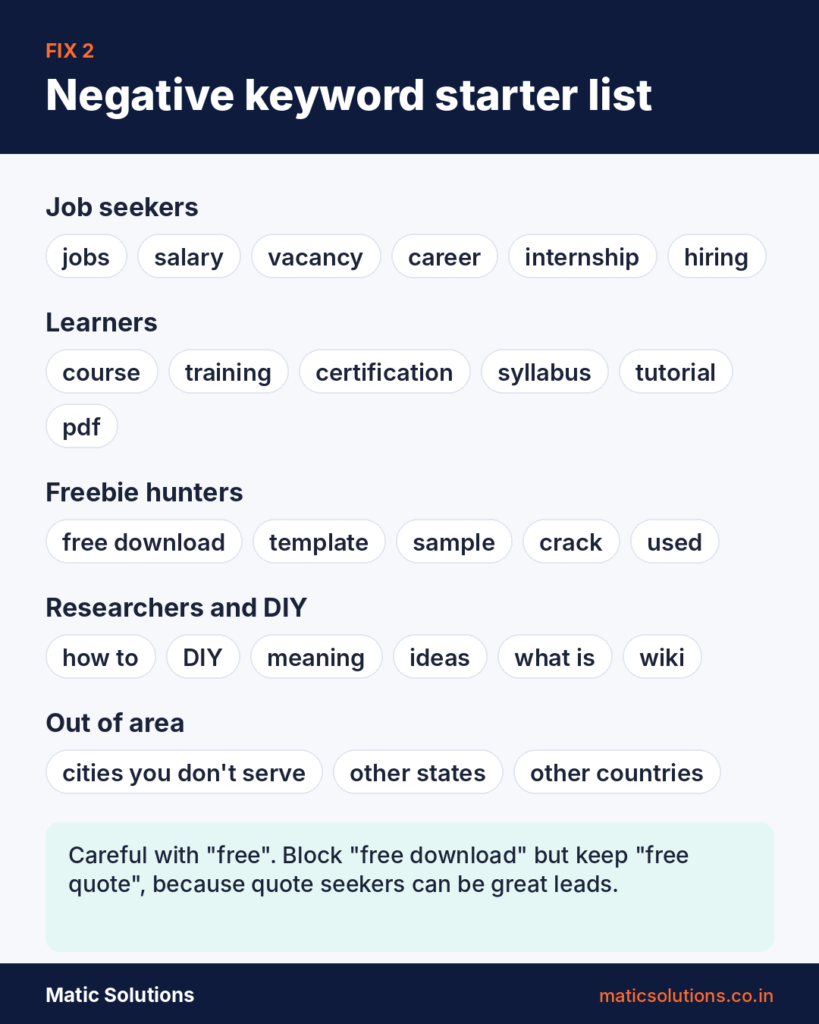
Your keywords are what you bid on. Search terms are what people really typed. The two can be very different.
Say an Ahmedabad interior design studio bids on “interior designer”. It might end up paying for searches like “interior designer salary” or “interior design course fees”. Those people will never fill in a quote form.
Open the search terms report every week for the first month. Add anything irrelevant as a negative keyword. Build a shared list of common waste words and apply it to every campaign. If you only serve one city, add the names of nearby cities you don’t cover as well.
This now works for Performance Max as well. PMax search terms show up in the standard report, and you can add up to 10,000 negative keywords per PMax campaign.
3. Tighten match types and bid on buying intent
Broad match lets Google show your ad for anything it thinks is related. With Smart Bidding and plenty of conversion data, that can work well. With little or no data, it often drifts into loosely related searches.
If leads are at zero, move your main keywords to phrase or exact match for now. You can test broad match again once you’re getting steady conversions. Then look at intent. “How to fix a leaking roof” is someone doing research. “Roof leak repair near me” is someone ready to call. Bid on the second kind first.
Words like cost, price, quote, near me, hire and service usually signal someone ready to buy. Words like how, what, ideas and DIY usually don’t.
Small budgets need extra focus. Don’t spread ₹15,000 a month across 100 keywords. Put it behind your 10 to 20 highest-intent terms so each one gets enough clicks to prove itself. Our Google Ads guide explains match types in more detail.
4. Check your location and ad schedule settings
Google’s default location option is “Presence or interest”. This means your ads can show to people who are only interested in your area, not just those who are in it. A clinic in Surat could pay for clicks from someone in Mumbai who is reading about Surat.
Open campaign settings and go to Locations. Switch to “Presence”, which targets people in or regularly in your chosen areas. Then check the Locations report to see where your clicks really came from.
Look at timing too. If nobody answers the phone after 7 pm, a “Call now” ad at 11 pm wastes money. Use an ad schedule to run call-focused ads only when someone can pick up, and check which days and hours bring your best leads.
5. Turn off Display expansion and review Search partners
New Search campaigns often have “Include Google Display Network” ticked by default. This puts your text ads on websites and apps, where people are browsing rather than searching. Those clicks are cheap and easy to get. That’s often why the click count looks great while leads stay at zero.
Untick the Display Network in your Search campaigns. Then segment your data by network and see how Search partners perform. If they bring clicks but no leads, switch them off too. You can always test them again once your core campaign is working.
For Performance Max, check where your ads appeared. Accidental taps inside mobile games and apps are a common leak. Use placement exclusions to block the worst offenders.
6. Write ads that filter out the wrong clicks
Ad copy can turn away the wrong people before they click. That saves you money.
If your service starts at ₹50,000, say so in the ad. If you only work with businesses, write “For B2B companies” or “Minimum order 100 units”. You’ll get fewer clicks. The ones you do get will come from people who can afford you.
Then check what you’re up against. Open Auction insights to see who else bids on your keywords, and search your main term to read their ads. If every ad says “best service at affordable prices”, yours won’t stand out either. Give people a clear reason to pick you, like a fixed price, a guarantee you can keep or a 30-minute callback.
Use price assets, sitelinks and callouts to answer basic questions up front. A visitor who already knows your price and service area is far more likely to get in touch.
7. Send traffic to a dedicated landing page
Sending ads to your homepage is one of the biggest reasons for clicks without leads. Your homepage talks about everything you do. The visitor searched for one thing.
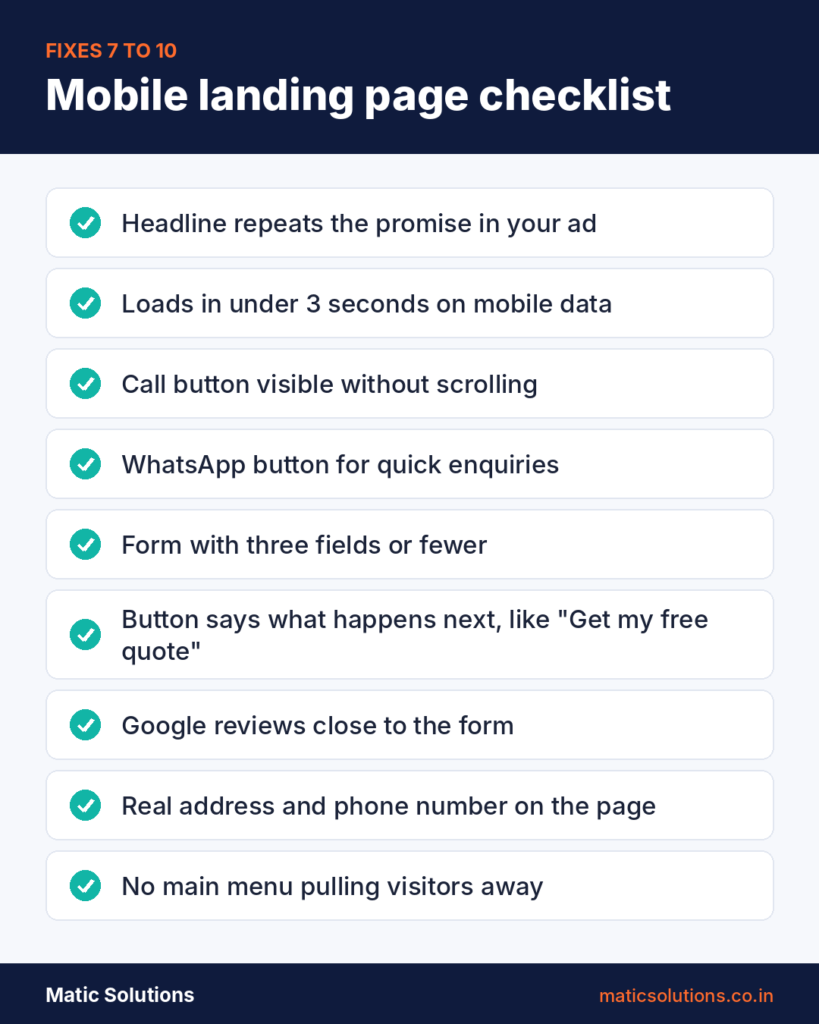
Build a landing page for each main service. The headline should repeat the promise in the ad. If the ad says “Same-day AC repair in Ahmedabad”, the page should open with exactly that. A poor match also hurts your Quality Score, which can push up what you pay for each click.
Give the page one clear goal and remove menus that pull people away. Put the form or call button above the fold so mobile users see it without scrolling. Make the button say what happens next. “Get my free quote” works better than “Submit”. Use a colour that stands out from the rest of the page. Our landing page design tips go into more detail.
8. Make the page fast on mobile
Most local service searches happen on phones. If your page is slow to load on a 4G connection, people hit back before they see your offer. You still pay for that click.
Test your landing page in PageSpeed Insights on mobile. Aim for it to load in under three seconds on mobile data, not office Wi-Fi. Compress large images and remove scripts you don’t need. Then open the page on your own phone and try to fill in the form with one thumb. If that feels awkward, it’s costing you leads.
Our guides on website speed and responsive web design are a good place to start.
9. Shorten the form and add more ways to reach you
Every extra field gives someone a reason to quit. Ask only for what you need to call them back. For most service businesses, that’s a name, a phone number and one line about what they need.
Plenty of people don’t want to fill in a form at all. In India especially, many would rather send a WhatsApp message or call straight away. Add a click-to-call button and a WhatsApp button to the page, plus a call asset on the ad itself. Track each one as a conversion so you can see which people prefer.
If you need more details to prepare a quote, collect them on the call.
10. Give visitors a reason to trust you
People are careful about sharing their number with a business they found five seconds ago. Show proof near the form. Google reviews, client logos and photos of real work all help.
Be specific. “500+ happy clients” is easy to skim past. “4.8 stars from 212 Google reviews” or “We call back within 15 minutes” is much harder to ignore.
Add your real address and phone number too. A page with nothing but a form can look like a scam, even when it isn’t. Good web design that builds trust makes a bigger difference to leads than most people expect.
11. Fix your bidding and feed lead quality back to Google
Maximize Clicks tells Google to get as many clicks as it can for your budget. It does exactly that, often by finding the cheapest and least interested visitors. It can help a brand-new account gather early data, but it shouldn’t run for long.
Once tracking is verified and leads are coming in, switch to Maximize Conversions. Many PPC managers wait for around 15 to 30 conversions a month before trying target CPA. Smart Bidding needs real data to learn from.
Next, teach Google what a good lead looks like. If every form fill counts the same, it will chase cheap form fills, spam and poor-fit enquiries included. Mark which leads became customers in your CRM, then send that data back using enhanced conversions for leads. Google describes this as an upgraded version of offline conversion import that uses details like email addresses to match leads more accurately. Since 15 June 2026, these uploads go through the Data Manager API instead of the Google Ads API, so check that your CRM connection still works.
A clean customer database makes this much easier.
In what order should you check these fixes?
Work from the bottom of the funnel up. It’s the fastest way to find the leak.
Start with tracking (fix 1), because every other decision depends on it. Then look at traffic quality (fixes 2 to 6). Wrong clicks are the most common cause of zero leads, and they’re quick to fix. Next, review the landing page (fixes 7 to 10). Finally, sort out bidding and the feedback loop (fix 11) once leads are flowing.
Give each change at least two weeks before you judge it. Avoid editing the campaign every day, because big changes restart Google’s learning. If you change everything at once, you won’t know what worked.
Get help fixing your Google Ads
If you've worked through this list and leads still aren't coming in, a fresh pair of eyes helps.
Matic Solutions runs Google Ads and PPC campaigns for businesses across India and Australia, and our web design team builds landing pages made to convert.
Get in TouchFrequently Asked Questions
The most common causes are broken conversion tracking, irrelevant search terms, Display Network clicks and a landing page that doesn’t match the ad. Test your tracking first, then check the search terms report. Most accounts find the problem in one of those two places.
At a 5% conversion rate, you’d expect about one lead for every 20 clicks. That’s why it’s best to judge a campaign after 50 to 100 clicks. If you’ve had more than 100 clicks with no leads at all, treat it as a setup problem.
Not in a new account or one with no conversion data. Start with phrases and exact matches plus a solid negative keyword list. Test broad match later, once Smart Bidding has steady conversions to learn from.
Not always. Lower the budget instead and work through the fixes above. Pausing stops the data you need to find the problem. If tracking is broken or the landing page is down, though, pause until it’s fixed.
For most small service businesses, a well-built Search campaign is easier to control and gives more visible data. Performance Max can work well once you have steady, accurate conversion data and solid negative keyword lists in place.
Tracking and setting fixes can show results within days. Landing page changes and bidding improvements usually take two to four weeks, because Google needs time to learn from the new data.